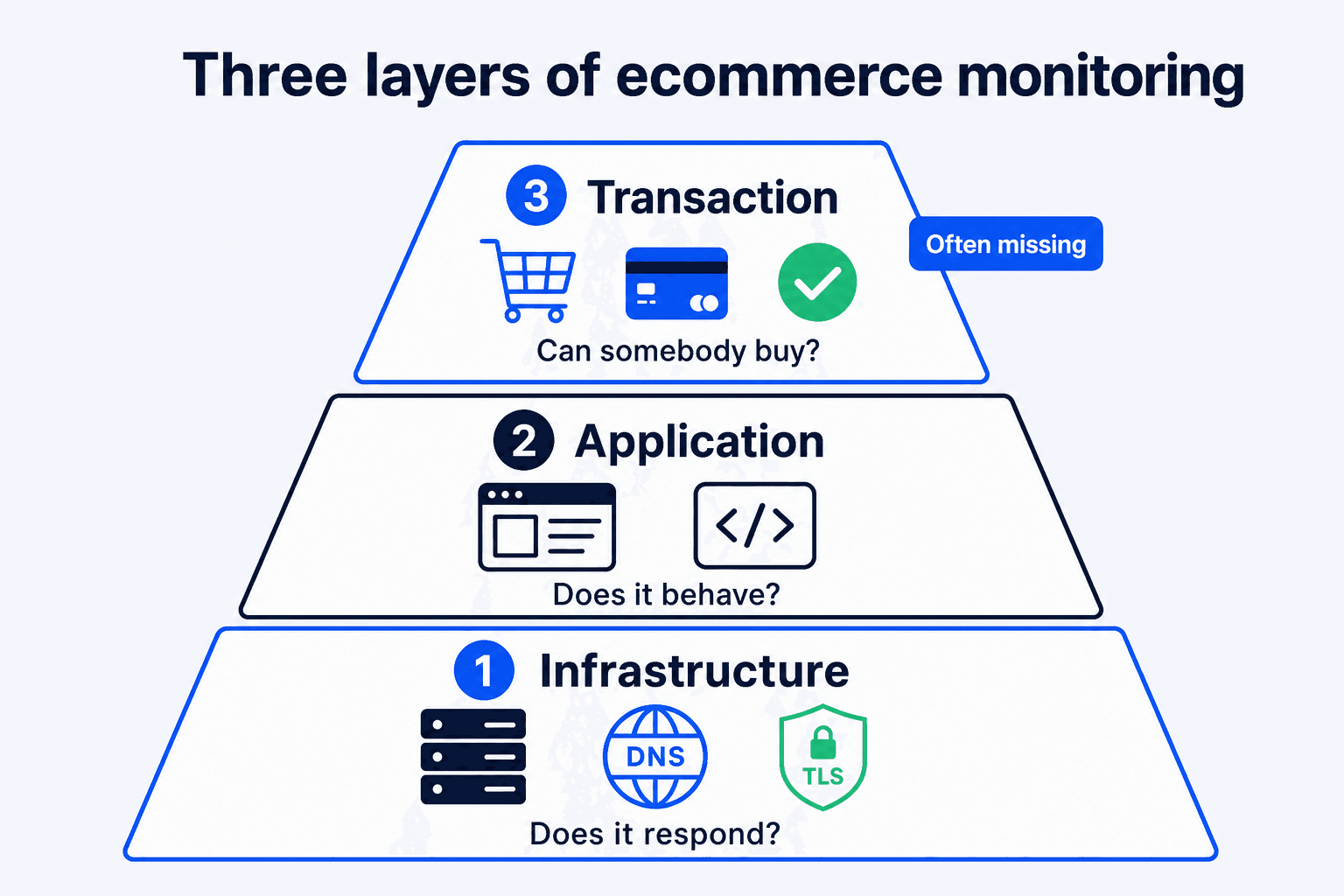
Ecommerce monitoring usually starts with a five-minute uptime check on the homepage. That is sensible, inexpensive, and incomplete. A store can return a clean 200 response while its checkout rejects every payment. This guide separates ecommerce monitoring into three layers, shows the six areas worth watching in any online store monitoring plan, and explains why the layer nearest to a completed order is often the one left untested.
Complete ecommerce monitoring covers infrastructure, application behavior, and the transaction path. The final layer is closest to revenue and often missing.
Ecommerce Monitoring Tools: Six Areas to Watch
Choose the questions before you choose the tools. These six areas cover the journey from a reachable storefront to a completed transaction. They are ordered from the easiest checks to automate to the ones that need the most careful setup.
Online Store Monitoring: Uptime and Response Time
Start with reachability: can a browser reach the store and does it respond in a reasonable time? Checks from more than one region can expose a hosting outage, TLS expiry, DNS trouble, or an application crash that returns a 500. Response-time trends are useful too. They often show a store getting slower before it becomes unavailable. This is the inexpensive baseline every store should have.
Checkout Completion
The revenue question is more specific: can a shopper add a product, receive a shipping option, submit payment, and reach the order-received page? Each step depends on the state created by the last one. A single page request cannot answer that question. A checkout needs a browser journey that follows the same path a customer follows.
Payment Gateway Health
Payment failures often hide behind a normal-looking checkout. A rotated credential, provider-side account restriction, changed plugin setting, or test mode left on after a deployment can all fail at the final step. The cart still works. The form still accepts input. Monitor the result of the payment attempt, not just the presence of the payment form.
Order Confirmation Flow
After payment the store still has work to do: create the order and show the correct order-received page. A browser test can verify those steps. Inbox delivery is a different concern. Check it through delivery logs or a dedicated email-delivery tool. The two checks complement each other, but neither proves the other.
Inventory and Stock Sync
When stock comes from an ERP, warehouse system, point-of-sale system, or marketplace feed, the sync can stop without making the storefront visibly fail. The symptoms arrive later: overselling, products stuck at zero stock, or prices that no longer match their source. Watch the sync job itself, including its last successful run, record count, and error rate. Then spot-check a few known products.
Search and Product Page Availability
Product pages, category pages, and internal search are common starting points for a purchase. A damaged search index, empty filter, or product template error can remove those paths without taking the whole store down. Test a representative product URL, a category URL, and a search query with a known result.
The Three Layers of Ecommerce Monitoring
The six areas fall into three layers. Each layer requires different evidence, and no lower layer can prove that the layer above it is working.
Layer 1: Infrastructure
This layer covers the server, network, DNS, TLS, and hosting. Its question is simple: does the service answer? Store monitoring software at this layer sends scheduled HTTP requests from one or more locations and alerts when a response is missing, slow, or unexpected. It is the mature part of monitoring, and there are many capable Pingdom alternatives for WordPress shops. Their alerts can arrive within seconds.
Layer 2: Application
This layer covers rendered pages, JavaScript and PHP errors, database queries, and third-party scripts. Its question is whether the application behaves as expected. Error tracking catches exceptions. Application performance monitoring exposes slow queries and transactions. Browser error reporting catches front-end failures that never reach the server. It can show that something broke inside a page. It cannot show whether a customer completed the task.
Layer 3: Transaction
This layer asks whether somebody can complete the intended action. For a checkout, that means a real browser session reaches the defined end state such as the order-received page and expected order reference. Forms belong here too. For many stores, a quote request or contact form is a commercial transaction. This is the only layer that tests the customer journey itself.
Three layers of ecommerce monitoring
Three layers of ecommerce monitoring
Three layers of ecommerce monitoring compared
Layer
Question it answers
Typical tools
Catches
Misses
1 Infrastructure
Does the server answer?
Uptime and status monitors
Outages, 500 errors, TLS expiry, DNS failures, slow responses
Anything that returns a normal 200 response
2 Application
Does the application behave?
Error tracking, APM, log aggregation
Exceptions, JavaScript errors, slow queries, fatal errors after updates
Logic failures that throw no error, such as a rejected payment
3 Transaction
Can somebody buy?
Synthetic browser tests, checkout monitoring
Broken add to cart, missing shipping rates, failed payment step, coupon and form failures
Infrastructure incidents between test runs, inbox delivery
The pattern in the final columns matters: each layer misses failures that the next layer can catch. Layers 1 and 2 are widely used because they are comparatively straightforward to deploy. Layer 3 is harder, and it is closest to the point where a shopper becomes an order. For a closer comparison, see uptime versus checkout monitoring.
Ecommerce Downtime vs Silent Checkout Failures
Teams do not skip transaction monitoring because checkout is unimportant. They skip it because a purchase is much harder to automate than a page request. Every obstacle below is a real engineering problem:
A payment path that succeeds. A test order must reach a valid order state without charging a real card. That usually means a gateway sandbox, provider test card, or payment method limited to the test session.
Stable test data. The product must stay in stock. The address must pass validation. The shipping zone must return a rate. If one of these drifts, the test fails for a reason unrelated to the customer experience.
Cleanup. A test run can create an order and may create related records or stock movements. Without a clear cleanup policy, test data soon distorts reporting and operations.
Resilience to change. Theme and checkout-template changes move selectors. A brittle test that raises false alarms will eventually be ignored.
Useful evidence. “Checkout failed” is not enough to start a fix. The failing step, screenshots, and browser errors give the person on call a place to begin.
Each problem is solvable. Together they explain why transaction monitoring remains on the backlog. The failure then surfaces in the familiar ways: a customer reports it or someone notices an unexplained change in orders.
Callout
The expensive part of a silent transaction failure is usually the detection delay. The code fix may be small. The interval before somebody sees the failure is where missed orders accumulate.
Setting Up Transaction Monitoring
The platform and tool can vary. These four requirements do not. Get them right first, then choose the implementation that fits your store.
1A test payment path. Use gateway sandbox credentials, a provider test card, or a payment method limited to the test session. It must create the expected order state without moving real money.
2A dedicated test product. Keep it out of catalog and search, in stock, and valid for the test address and shipping zone. Do not use a product that customers might purchase.
3Cleanup logic. Delete or clearly flag test orders so reporting, accounting, and stock remain trustworthy. Decide in advance whether the system removes these orders or excludes them with a marker.
4Alerting that reaches a human. Send failures to a channel somebody reads and include the failed step and useful evidence. Define what happens after a repeat failure.
ShopMonitor applies this approach to WooCommerce. It runs scheduled browser journeys through checkout and forms, then verifies the checkout or thank-you path and records step-level evidence when a run fails. Test orders are marked for cleanup. It does not replace uptime monitoring, security scanning, backups, or performance optimization. It tests browser checkout, form, and thank-you journeys. It does not verify inbox delivery.
The same requirements apply to Shopify, Magento, BigCommerce, and custom stacks, but ShopMonitor is built for WooCommerce. General-purpose synthetic browser-testing tools can script comparable flows on other platforms, usually with more configuration work. Before automating anything, walk the flow through once by hand. Our WooCommerce testing guide is the same sequence a synthetic test performs.
Layers 1 and 2 can show that the store is technically available. Layer 3 checks whether the customer journey actually completes.
Ecommerce Site Monitoring by Store Size
Monitoring frequency should follow order volume because volume changes the cost of a slow detection. Divide monthly orders by 30, then by 24, to estimate orders per hour. Multiply that by average order value to frame the exposure during a failed checkout. Use the result to decide whether a faster check is worth the extra effort.
Ecommerce monitoring checklist by store size
Ecommerce monitoring checklist by store size
Under 100 Orders per Month
At roughly three orders a day, keep the setup proportionate. A simple baseline is better than an elaborate plan that never gets maintained.
Layer 1: check the homepage, shop page, and checkout URL every five minutes. A free tier can be enough. Compare uptime monitoring with checkout monitoring before you assume a green uptime chart means sales are safe.
Layer 2: enable error logging and review it monthly.
Layer 3: run one checkout test each day and test each critical form.
100 to 1000 Orders per Month
At three to thirty orders a day, a morning of failed checkout becomes visible in the numbers. Manual spot checks stop being a reliable control.
Layer 1: check uptime every one to five minutes from more than one region, with a keyword check on the checkout page.
Layer 2: use error tracking that alerts on new exception types, not only a log file.
Layer 3: test checkout every few hours, test forms daily, and add a run after a deployment or plugin update.
Over 1000 Orders per Month
Above thirty orders a day, an hour of checkout failure is a measurable commercial and support event.
Layer 1: use a one-minute interval from more than one region, with escalation and an on-call path.
Layer 2: use APM with transaction traces and browser error reporting from real sessions.
Layer 3: run checkout tests at least hourly. Increase frequency during campaigns, cover each payment method and major shipping zone, and run a test as part of deployment.
Frequently asked questions
Ecommerce monitoring is the scheduled checking of an online store across three layers: infrastructure, application, and transaction. Infrastructure asks whether the service responds. Application monitoring asks whether the software behaves. Transaction monitoring checks whether a shopper can complete the intended journey. A complete setup needs all three.
Monitor uptime and response time, checkout completion, payment results, the order-confirmation flow, inventory and stock sync, and product, category, and search-page availability. Start with uptime because it is straightforward. Then add checkout completion because it tests the path customers use to place an order.
Match the interval to order volume and the cost of delayed detection. Under 100 monthly orders, a daily test is a practical starting point. Between 100 and 1000, test every few hours. Above 1000, test at least hourly and more often during campaigns. Also test after deployments, plugin updates, or payment-configuration changes.
Transaction monitoring runs a complete workflow in a browser and checks it against a defined end state. Uptime monitoring asks whether a page responds. Application monitoring asks whether code is slow or throwing errors. Transaction monitoring asks whether the customer journey completed, such as reaching the order-received page after payment.
The monitoring model works across platforms. The three layers and the setup requirements are the same for Shopify, Magento, BigCommerce, and custom stacks. The tooling changes. ShopMonitor is built for WooCommerce. General-purpose synthetic browser-testing tools can support other platforms with more configuration work.
Test the Customer Journey That Matters
ShopMonitor runs scheduled browser tests for WooCommerce checkout and forms, then records evidence when a journey fails.
Written by the team at Winning Solutions, the agency behind ShopMonitor. We build practical monitoring for WooCommerce checkout and form journeys, so a healthy homepage is not mistaken for a working purchase path.
Ecommerce Monitoring: What to Track Beyond Uptime | ShopMonitor