woocommerce
WooCommerce HPOS: What It Is and How to Migrate
October 30, 20269 min read·ShopMonitor Team
Loading…
WooCommerce HPOS, short for High Performance Order Storage, moves your orders out of the WordPress posts and postmeta tables into four dedicated order tables. It has been the default for new WooCommerce installations since version 8.2 in October 2023, which means every store older than that is still running on the legacy structure unless someone switched it deliberately. So the practical question is not whether HPOS is good. It is whether your particular store, with your particular plugins, can migrate this week or should wait.
WooCommerce HPOS order storage compared to legacy postmeta
Animated comparison of legacy posts and postmeta storage versus four dedicated HPOS order tables
The change is structural, not cosmetic. Nothing about your products, customers, or checkout template moves. Only the place where order data lives changes, and that turns out to touch a surprising amount of code.
High Performance Order Storage: Custom Order Tables
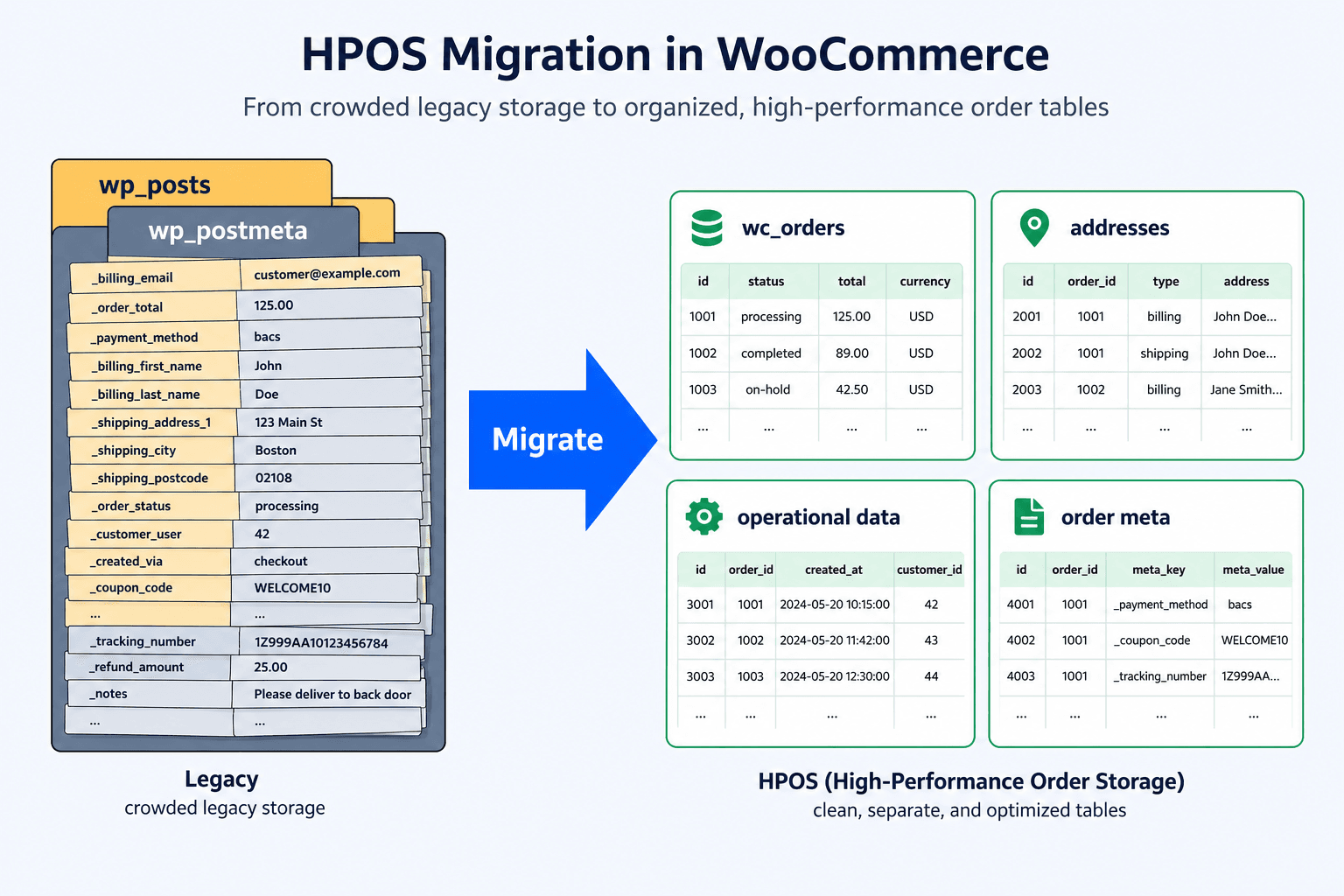
In the legacy model, a WooCommerce order is a WordPress post with the post type shop_order. Every piece of information attached to it (billing address, shipping method, order total, payment method, transaction ID, dozens of internal flags) is a separate row in wp_postmeta, keyed by the order ID.
HPOS replaces that with four purpose built tables: wp_wc_orders for the order itself, wp_wc_order_addresses for billing and shipping addresses, wp_wc_order_operational_data for operational fields, and wp_wc_orders_meta for anything left over. Fields that used to be untyped metadata rows are now actual columns with actual indexes.
Why WooCommerce Made the Change
wp_postmeta was never designed as an order database. It is a generic key value store shared by every post type on your site, so a single order query filters a table that also holds page revisions, product attributes, and whatever every other plugin decided to save there.
Dedicated tables let WooCommerce index the fields it actually queries and keep order writes off a table the rest of WordPress is constantly touching.
Legacy posts and postmeta storage vs HPOS order tables
| Aspect | Legacy posts and postmeta | HPOS order tables |
|---|---|---|
| Where an order lives | wp_posts row plus many wp_postmeta rows | wp_wc_orders row plus three related tables |
| Field storage | Untyped meta keys, one row per field | Typed columns with indexes |
| Table sharing | Shared with every post type and plugin | Order data only |
| Reading one order | Multiple joins against a large shared table | Direct row lookups |
| Custom queries | meta_query against postmeta | wc_get_orders() and the order tables |
| Default for new installs | Before WooCommerce 8.2 | WooCommerce 8.2 and later |
Be skeptical of any article that gives you a percentage. The gain depends on your order count, your hosting, your database configuration, and how many plugins query orders badly. What is predictable is where you notice a difference: the admin order list, order search, filtered views by status or date, and reporting queries. All of those were the queries hurting most under postmeta.
What you should not expect is a faster storefront. Product pages, category pages, and the cart barely touch order data, so HPOS does very little for front end page speed.
If your store feels slow to shoppers, the cause lies elsewhere and database performance work on orders will not fix it.
Yes, eventually. HPOS is the direction WooCommerce is going, and legacy storage is maintained for compatibility rather than developed further. The question is timing.
Store Size Where It Makes a Difference
A store with a few hundred orders will notice almost nothing, because a few hundred orders is a small query no matter how it is stored. The benefit scales with order volume and with how much your team lives inside the admin order list. Stores in the tens of thousands of orders and up, especially those where staff filter and search orders all day, feel it most.
That said, small stores have the easiest migration, because there is less data to sync and less history to verify. Being small is a reason to migrate calmly, not a reason to skip it.
When to Wait
Three situations justify postponing:
There is one more case that is not a reason to wait but a reason to plan: seasonal peaks. Do not migrate order storage the week before your busiest sales period.
Callout
This is the step that decides whether the rest goes smoothly, and WooCommerce gives you most of the answer for free.
Go to WooCommerce > Settings > Advanced > Features. If an active plugin has declared itself incompatible with HPOS, WooCommerce disables the order data storage option and shows a warning with a View and manage link next to it. That link opens a filtered plugin list. You can also reach it directly:
https://example.com/wp-admin/plugins.php?plugin_status=incompatible_with_feature&feature_id=custom_order_tablesReplace example.com with your own domain. Read that list plugin by plugin, then check each one for updates and for a changelog entry mentioning HPOS or custom order tables. Many plugins that were incompatible two years ago are fine now.
WooCommerce HPOS plugin compatibility check
Plugins fall into three states, and the middle one is where people get caught out.
The three plugin compatibility states and what each one means
| State | What it means | What WooCommerce does |
|---|---|---|
| Compatible | The plugin declares HPOS support in its main file | Nothing, migration is unblocked |
| Incompatible | The plugin declares that it does not support HPOS | Blocks the HPOS setting and warns you |
| Uncertain | The plugin declares nothing either way | Does not block, flags it as unknown |
An uncertain plugin is not a broken plugin. It is a plugin nobody has told WooCommerce about, which describes a lot of small custom code and older extensions. Those are exactly the ones to test by hand.
When something genuinely is incompatible, the damage is quiet. Code that calls get_post_meta() on an order ID or writes with update_post_meta() does not throw an error under HPOS. It reads nothing and writes into a table nobody is looking at anymore. So the order saves, the admin shows it, and the shipping reference or accounting field that plugin was responsible for is simply empty. You find out when a customer asks where their parcel is.
In practice the same categories keep appearing:
For a code level check, search your plugin and theme directory for get_post_meta, update_post_meta, WP_Query, and post_type combined with shop_order. Every hit is a place to look at. Orders should be read with wc_get_order() and queried with wc_get_orders(), which work under both storage modes.
Six steps, in this order. The whole point of the sequence is that you can stop and reverse at any point before the last one.
Callout
Callout
Test on staging first, then repeat the same list on production after the switch. Work through it in test mode so you are not creating real charges:
HPOS problems rarely announce themselves. They show up as a field that stopped being filled in, on one type of order, noticed days later by whoever needed that field.
That timing is the practical difficulty. A single test order on migration day passes, because your test order is simple and recent. The failure lives in the refunded order placed by a returning customer with a coupon, three days later.
This is where scheduled testing earns its place: ShopMonitor runs your checkout in a real browser on a daily schedule and alerts you when a step stops working, so a path that broke on Tuesday does not stay broken until Friday. It verifies the browser checkout and the order received page, not whether a message landed in an inbox, which stays a separate check.
Migrations are also a good moment to review what your maintenance retainer actually covers, since order storage sits precisely between "plugin update" and "someone should test this".
Rolling back is straightforward if you planned for it and awkward if you did not. The difference is entirely whether compatibility mode was on.
With compatibility mode still enabled, the legacy tables hold a current copy of every order, so reverting is a settings change:
Orders created while HPOS was authoritative are already in the legacy tables, so nothing is lost.
Without compatibility mode, you have a gap. Every order placed since you turned it off exists only in the HPOS tables, and the legacy tables are stale as of that moment. You can re-enable compatibility mode and let WooCommerce backfill in the other direction, which usually works but takes time and needs verifying with wp wc hpos verify_data before you switch. The alternative is restoring the backup from step 1, which loses every order placed since. Neither is a comfortable position, which is why step 6 comes last and unhurried.
Callout
If the migration is one of several changes you made in the same window, isolate it before you conclude anything. Order storage, a plugin update, and a theme change on the same day produce symptoms that look identical. Revert one change at a time before you treat the migration as the cause.
ShopMonitor runs automated checkout and form tests every day and alerts you the moment something breaks. No code changes. No plugins. Setup in 5 minutes.
No credit card required.

About the author
Written by the team at Winning Solutions, the agency behind ShopMonitor. We help WooCommerce stores migrate order storage safely and catch checkout regressions that silent HPOS incompatibilities leave behind.