CAPTCHAs exist to stop bots. Checkout monitoring tools are bots — deliberate, scheduled, real-browser bots that place test orders so you know Place Order still works. Put both on the same WooCommerce checkout without a plan and every nightly run fails on a challenge widget while real customers keep shopping. You get false “checkout down” alerts — or you turn monitoring off and learn about breakage from a customer ticket.
You do not have to choose between spam protection and visibility. This guide covers why CAPTCHAs collide with monitoring, which providers show up on WooCommerce checkouts, and three safe ways to let automated tests through. Pair it with a solid WooCommerce checkout testing workflow so every CAPTCHA change is verified the same day.
CAPTCHA gate blocks a checkout monitoring request until an allow path lets the order complete
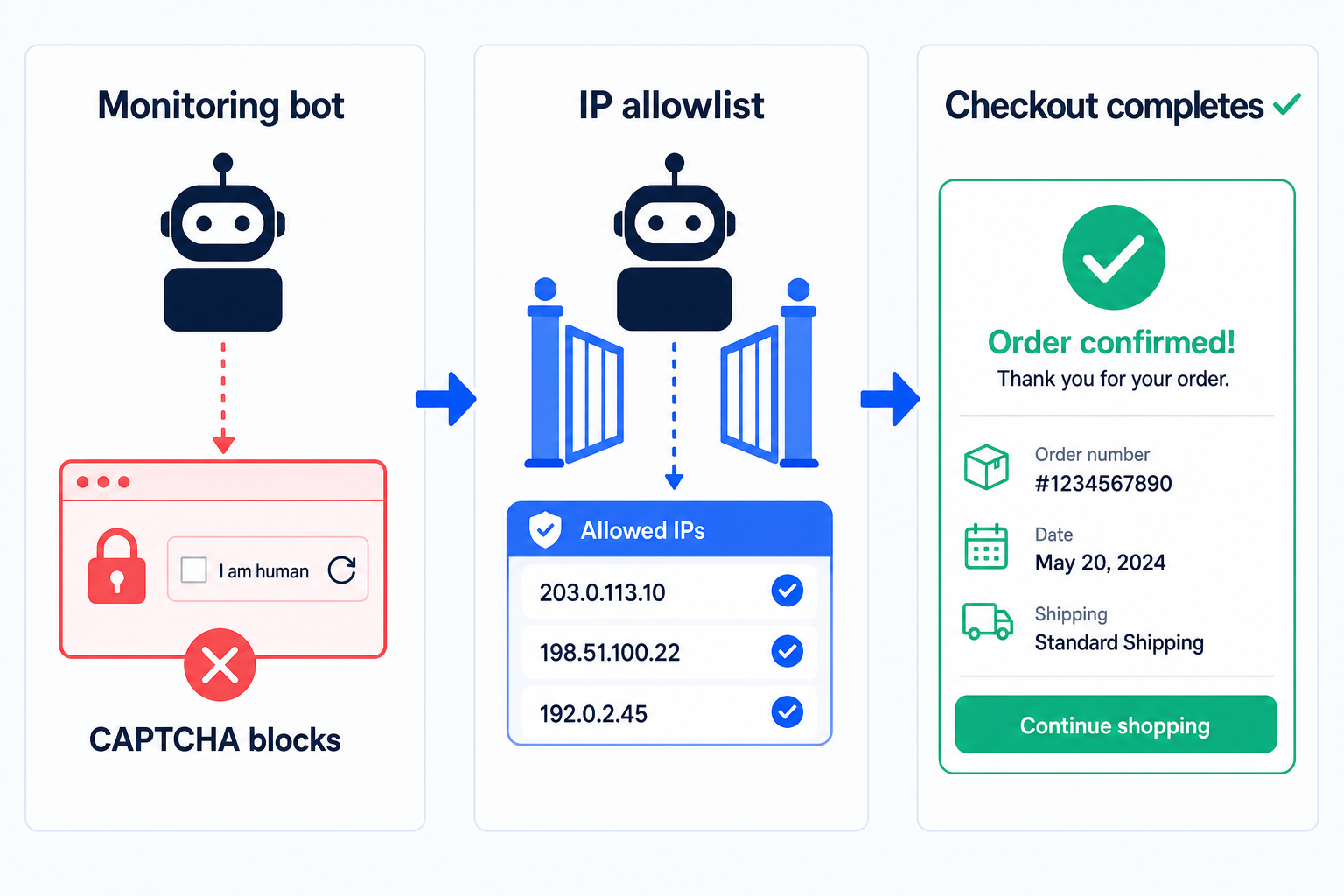
Animated diagram: a checkout request hits a CAPTCHA padlock; the monitor is blocked, then allowed via test key / IP allow — order completes.
The Conflict: CAPTCHAs Are Designed to Block Bots
A CAPTCHA scores “is this a human?” Monitoring answers “no” by design: headless or remote Chrome, datacenter egress, repeatable form fills. That is the same fingerprint CAPTCHA vendors train to stop carding and spam.
Challenge widgets stop headless flows
reCAPTCHA v2 checkboxes, image puzzles, and interactive Turnstile challenges expect a human. A monitoring agent cannot solve them reliably — and should not use CAPTCHA farms.
Invisible scores still fail datacenter IPs
reCAPTCHA v3 and non-interactive Turnstile return a score. Cloud worker IPs often score as “likely bot,” so the plugin rejects Place Order even when no puzzle appears.
False failures poison your signal
If every run dies on CAPTCHA, you stop trusting alerts. Real plugin or gateway failures hide in the noise — the exact opposite of why you monitor checkout.
Disabling CAPTCHA for everyone is the wrong fix
Turning the plugin off site-wide invites spam orders and credential stuffing. Scope exceptions to test keys, known monitor IPs, or a non-public test path — never the whole storefront for all visitors.
Edge WAFs create a similar false-positive pattern. If Cloudflare challenges sit in front of CAPTCHA, fix the edge first — see Cloudflare blocking WooCommerce checkout — then tune the CAPTCHA layer.
Types of CAPTCHA on WooCommerce Checkout
Most stores add CAPTCHA through a plugin (Google reCAPTCHA, hCaptcha, Cloudflare Turnstile) hooked into checkout validation. Behavior differs — your bypass strategy should match the product.
Google reCAPTCHA v2
Checkbox or image challenge. Explicit human proof. Monitoring cannot pass without a test key, IP exception in a custom rule, or a CAPTCHA-free test URL.
Google reCAPTCHA v3
Invisible score (0.0–1.0). Plugins reject low scores on Place Order. Datacenter monitors often fail silently — look for “score too low” in plugin logs, not a visible widget.
hCaptcha
Privacy-focused challenge similar to v2. Same monitoring problem: interactive puzzles block agents. Use hCaptcha’s testing keys / accessibility options only in non-production, or allowlist monitor IPs if your plugin supports it.
Cloudflare Turnstile
Often frictionless for real browsers; still flags headless and low-trust IPs. Combine with Cloudflare WAF allow rules for monitoring egress when Turnstile and Bot Fight both sit on checkout.
Identify which one you run
View checkout source or Network tab for google.com/recaptcha, hcaptcha.com, or challenges.cloudflare.com. Note the plugin name under WooCommerce → Settings or your security suite — test-key and allowlist UIs live there, not in WooCommerce core.
Option 1 – CAPTCHA Test Key
Google publishes always-pass (and always-fail) reCAPTCHA keys for automation. Several plugins expose a “test mode” or accept those keys on staging. Cleanest option when you can run monitoring against a staging clone or a short production window with test keys.
How to use it safely
1Confirm your CAPTCHA plugin documents Google’s test site/secret keys (or a built-in “always pass” toggle). Official Google always-pass site key: 6LeIxAcTAAAAAJcZVRqyHh71UMIEGNQ_MXjiZKhI — use only where Google documents them for testing.
2On staging: swap live keys for test keys, save, place a guest checkout through your monitor. Expect Place Order to skip the human challenge.
3On production: prefer Options 2 or 3. Leaving always-pass keys on a public live checkout disables CAPTCHA for everyone who hits that site key — including attackers.
4After any key change, run one manual guest order and one monitored run. Confirm spam protection still rejects a throwaway bot POST if you are back on live keys.
Production warning
Never commit always-pass keys to a live storefront “just for ShopMonitor.” Attackers reuse the same Google test keys. Staging + production-like CDN is the right place for Option 1.
Option 2 – IP Allowlisting
Keep live CAPTCHA keys for customers. Tell the CAPTCHA plugin (or a small mu-plugin) to skip verification when the request comes from your monitoring provider’s egress IPs. Real shoppers still solve challenges; scheduled runs pass.
A monitoring bot hits CAPTCHA first. After an IP allowlist, the same checkout run completes.
Implementation checklist
1Get the current monitoring egress IP list from your provider. Refresh it when they rotate ranges — stale lists recreate false failures overnight.
2If the plugin has “whitelist IPs” / “bypass for these addresses,” add those IPs only. Do not paste an entire cloud ASN.
3If the plugin has no UI: a tiny WordPress filter that short-circuits CAPTCHA validation when REMOTE_ADDR is in an allowlist — review with your developer; keep the list in config, not hard-coded secrets.
4When Cloudflare sits in front, allowlist the same IPs at the WAF so the request reaches WordPress without a Managed Challenge. CAPTCHA bypass alone does not help if the edge never forwards the POST.
5Verify in monitoring history: runs show checkout success, not “challenge page” or score-reject messages.
When you first connect the store, follow how to add a website so the monitored hostname matches what customers and CAPTCHA see (www vs apex, HTTPS). Allowlisting the wrong host wastes the change.
Scope beats shortcuts
IP allowlisting preserves production CAPTCHA strength. Re-audit the list quarterly. Never open CAPTCHA for “all bots” or User-Agent substrings — those are trivial to spoof.
Option 3 – Separate Checkout Page Without CAPTCHA
Some teams monitor a dedicated checkout URL that skips CAPTCHA (query flag, separate page template, or staging subdomain) while public /checkout keeps full protection. Useful when the plugin cannot IP-bypass and you refuse test keys on production.
Guardrails if you use this pattern
1Gate the CAPTCHA-free page: HTTP auth, VPN, secret token in a signed cookie set only by your monitor, or a hostname that is not linked from the theme.
2Do not leave ?skip_captcha=1 publicly documented or linked from Google. Indexing a CAPTCHA-free checkout is an open spam funnel.
3Keep payment gateways in test mode on that path when possible, or use a hidden catalog product with cleanup — same hygiene as any checkout test.
4Accept the trade-off: you prove a sibling path, not the exact public template. Prefer Options 1–2 when you need pixel-identical coverage of live /checkout.
Security note
A secret URL is not authentication. Assume someone will find it. Combine with IP allowlisting or auth. If you cannot harden it, do not ship Option 3.
The Right Balance: Security + Monitoring
Goal: humans and payment providers complete checkout under full CAPTCHA policy; only your known monitoring identity skips the human check.
Keep for everyone
Allow only for monitors
Live reCAPTCHA / hCaptcha / Turnstile keys on public /checkout
Test keys on staging only — never always-pass on the live site key
CAPTCHA on login, registration, and contact forms
IP allowlist limited to published monitoring egress
WAF + CAPTCHA stacked for anonymous abuse traffic
Edge Skip + CAPTCHA bypass for the same monitor IP list
Fail-closed for unknown low scores
Documented bypass path with owner + quarterly review date
After every CAPTCHA plugin update, Cloudflare rule change, or hosting IP migration, re-run one monitored guest checkout. CAPTCHA regressions look like “payment gateway down” to customers — separate them before peak traffic.
Prefer IP allowlisting on production; reserve always-pass keys for staging.
Treat CAPTCHA and Cloudflare as two layers — fix both when monitoring fails.
Keep a manual guest checkout so you can confirm real humans still see the widget.
Stop Losing Revenue to Broken Checkouts
ShopMonitor runs automated checkout and form tests every day – and alerts you the moment something breaks. No code changes. No plugins. Setup in 5 minutes.
CAPTCHA (or an edge challenge in front of it) treats datacenter browsers as bots. Customers on residential IPs pass; your monitor does not. Check plugin logs for score rejects and Cloudflare Events for challenges on the same POST.
No — and it should not. Solving challenges with third-party farms violates most CAPTCHA terms and weakens your store. Configure test keys on staging, IP allowlisting, or a hardened CAPTCHA-free test path instead.
No. Those keys are public and disable protection for anyone using them. Use them on staging or local only. On production, keep live keys and allowlist monitoring IPs or use a locked-down alternate checkout.
Turnstile is often quieter for real users, but headless and cloud IPs can still fail. You still need an allowlist or staging test keys. If Cloudflare Bot Fight also challenges the monitor, fix WAF allow rules in addition to Turnstile.
Both when Cloudflare proxies the shop. Edge allow/skip so the request reaches origin; CAPTCHA plugin allowlist so WordPress validation accepts the Place Order POST. Allowlisting only one layer leaves the other blocking the run.
Not if the bypass is scoped to known egress IPs (or a non-public authenticated test URL). Broad User-Agent or “disable for bots” rules are unsafe. Review the IP list when your provider rotates ranges.
Last updated: August 2026. Covers reCAPTCHA v2/v3, hCaptcha, Turnstile, test keys, IP allowlisting, and CAPTCHA-free test paths for WooCommerce checkout monitoring.
About the author
Written by the Winning Solutions team — the agency behind ShopMonitor. We tune CAPTCHA and checkout monitoring together so stores keep bot defense without silencing their own tests.
How CAPTCHAs Affect WooCommerce Checkout Monitoring (and What to Do) | ShopMonitor